

Insert the Modules in the Cabinet
 DANGER DANGER |
|---|
|
HAZARD OF ELECTRIC SHOCK, EXPLOSION, OR ARC FLASH
Never install a damaged module.
Check that blind covers are installed in all empty slots
in the module racks.
Failure to follow these instructions will result in death or serious injury.
|
 CAUTION CAUTION |
|---|
|
Unintended Operation
Never attempt to insert a module of a different rating
into a rack coded for another rating.
Check that the rating of the module is according to the
system rating plate.
Failure to follow these instructions can result in injury or equipment damage.
|
- Carefully insert the module (A) with both hands
in an empty slot starting from the left, with the screw at the bottom.
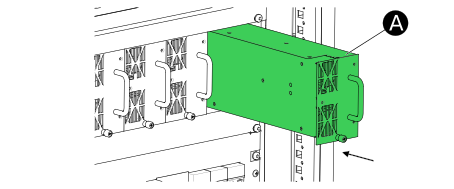
- Make sure that the module is fully inserted and that the module front is flush to the protective covers.
- Tighten the screw (B) at the bottom by hand.

- Repeat for the remaining modules. There should be no empty slots between the modules.
- Check that blinds covers are firmly installed in all empty slots to the right in the module rack(s). If necessary, tighten the screws on the blind covers.