|
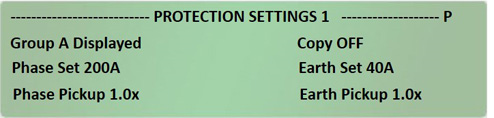
Protection Setting 1...3
|
|
|
|
Protection Setting 4(1)
|
|
|
|
Protection Setting 5, 6
|
|
|
| |
Protection Setting Alarms 1, 2
|
|
| |
Protection Setting 7(2)(3)
|
|
Protection Setting 8(8)
|
|
|
| |
Protection Setting 9(5)
|
|
|
Cold Load Pickup Protection
|
|
|
| |
Sync Check Settings 1 - 4(6)
|
|
| |
Directional Blocking Phase 1, 2(7)
|
Directional Protection 1(8)
|
| |
Directional Blocking Earth(7)
|
Dir Protection Phase 2, 3(8)
|
| |
Directional Blocking SEF(7)
|
Dir Protection Earth 4, 5(8)
|
| |
Vzps Compensation(7)
|
Dir Protection SEF 6, 7(8)
|
| |
High Vzps Alarm(7)
|
Vzps Compensation(8)
|
| |
|
High Vzps Alarm(8)
|
| |
Phase Threshold Trip No 1(9)
|
|
|
Phase Protection Trip No 1
|
|
|
| |
Phase Protection Reset No 1(10)
|
|
| |
Phase Threshold Trip No 2(9)
|
|
|
Phase Protection Trip No 2
|
|
|
| |
Phase Protection Reset No 2(10)
|
|
| |
Phase Threshold Trip No 3(9)
|
|
|
Phase Protection Trip No 3
|
|
|
| |
Phase Protection Reset No 3(11)
|
|
| |
Phase Threshold Trip No 4(12)
|
|
|
Phase Protection Trip No 4
|
|
|
| |
Phase Protection Reset No 4(11)
|
|
| |
Phase Single Shot Threshold Trip(12)
|
|
|
Phase Single Shot Prot Trip
|
|
|
| |
Phase Single Shot Prot Reset(11)
|
|
| |
Phase Work Tag Threshold Trip(12)
|
|
|
Phase Work Tag Prot Trip
|
|
|
| |
Phase Work Tag Prot Reset(11)
|
|
| |
Phase Protection Max Times(13)
|
|
| |
Earth Threshold Trip No 1(12)
|
|
|
Earth Protection Trip No 1
|
|
|
| |
Earth Protection Reset No 1(11)
|
|
| |
Earth Threshold
Trip No 2(12)
|
|
|
Earth Protection Trip No 2
|
|
|
| |
Earth Protection Reset No 2(11)
|
|
| |
Earth Threshold Trip No 3(12)
|
|
|
Earth Protection Trip No 3
|
|
|
| |
Earth Protection Reset No 3(11)
|
|
| |
Earth Threshold Trip No 4(12)
|
|
|
Earth Protection Trip No 4
|
|
|
| |
Earth Protection Reset No 4(11)
|
|
| |
Earth S Shot Threshold Trip(12)
|
|
|
Earth Single Shot Prot Trip
|
|
|
| |
Earth Single Shot Reset(11)
|
|
| |
Earth W Shot Threshold Trip(12)
|
|
|
Earth Work Tag Prot Trip
|
|
|
| |
Earth Work Tag Reset(11)
|
|
| |
Earth Protection Max Times(13)
|
|
| |
SEF Threshold Trip No 1(12)
|
|
|
SEF Protection Trip No 1
|
|
|
| |
SEF Protection Reset No 1(11)
|
|
| |
SEF Threshold Trip No 2(12)
|
|
|
SEF Protection Trip No 2
|
|
|
| |
SEF Protection Reset No 2(14)
|
|
| |
SEF Threshold Trip No 3(11)
|
|
|
SEF Protection Trip No 3
|
|
|
| |
SEF Protection Reset No 3(15)
|
|
| |
SEF Threshold Trip No 4(16)
|
|
|
SEF Protection Trip No 4
|
|
|
| |
SEF Protection Reset No 4(15)
|
|
| |
SEF Single Shot Threshold Trip(16)
|
|
|
SEF Single Shot Protection Trip
|
|
|
| |
SEF Single Shot Prot Reset(15)
|
|
| |
SEF Work Tag Threshold Trip(16)
|
|
|
SEF Work Tag Protection Trip
|
|
|
| |
SEF Work Tag Prot Reset(15)
|
|
| |
SEF Protection Max Times
|
|
| |
NPS Threshold Trip No 1(16)
|
|
| |
NPS Protection Trip No 1(17)
|
|
| |
NPS Protection Reset No 1(18)
|
|
| |
NPS Threshold Trip No 2(17)
|
|
| |
NPS Protection Trip No 2(18)
|
|
| |
NPS Protection Reset No 2(19)
|
|
| |
NPS Threshold Trip No 3(17)
|
|
| |
NPS Protection Trip No 3(18)
|
|
| |
NPS Protection Reset No 3(19)
|
|
| |
NPS Threshold Trip No 4(17)
|
|
| |
NPS Protection Trip No 4(18)
|
|
| |
NPS Protection Reset No 4(19)
|
|
| |
NPS Single Shot Threshold Trip(17)
|
|
| |
NPS Single Shot Protection Trip(18)
|
|
| |
NPS Single Shot Prot Reset(19)
|
|
| |
NPS Work Tag Threshold Trip(17)
|
|
| |
NPS Work Tag Protection Trip(18)
|
|
| |
NPS Work Tag Prot Reset(19)
|
|
| |
NPS Protection Max Times(19)
|
|
| |
|
|
| |
Under/Over Frequency Protection 1,2(20)
|
|
| |
Rate of Change of Frequency(20)
|
|
| |
NVD Protection 1, 2(20)
|
|
| |
NVD Alarm 1, 2(21)
|
|
| |
Broken Conductor Protection(21)
|
|
| |
Broken Conductor Alarm(21)
|
|
| |
Under Voltage Protection(22)
|
|
| |
Over Voltage Protection(22)
|
|
| |
Under/Over Voltage Protection(22)
|
|
| |
Under/Over Voltage Protection(22)
|
|
| |
Fault Locator(23)
|
|
| |
Conductor Characteristics(24)
|
|
|
(1) Not displayed when Per Trip Thresholds are available.
(2) Only displayed when Extended Standard Protection On.
(3) Not displayed when Per Element Protection is available.
(4) Only displayed when either Close on Fault Trip
or Per Element Protection are available.
(5) Only
displayed when Ground Fault Neutralizer is available.
(6) Only displayed when Sync Check available.
(7) Only
displayed when Directional Blocking is available.
(8) Only displayed when Directional Protection is available Directional
Blocking and Directional Protection are mutually exclusive.
(9) Only displayed when Per Trip Thresholds are available.
(10) Only displayed when Reset Curves are available.
(11) Only displayed when Reset Curves are available.
(12) Only displayed when Per Trip Thresholds are available.
(13) Only displayed when Extended Maximum Time per
Curve is on.
(14) Only displayed when Reset Curves
are on.
(15) Only displayed when Per Trip Thresholds
are available.
(16) Only displayed when Per Trip
Thresholds and Sequence Components are both available.
(17) Only displayed when Sequence Components are available.
(18) Only displayed when Sequence Components and Reset
Curves are available.
(19) Only displayed when Sequence
Components and Extended Maximum Time per Curve are on.
(20) Only displayed when Under/Over Frequency Protection is
available.
(21) Only displayed when Neutral Voltage
Displacement is available.
(22) Only displayed when
Broken Conductor is available.
(23) Only displayed
when Under/Over Voltage Protection is available.
(24) Only displayed when Fault Locator is available.
|