

UOF Protection Configuration
If UOF protection is required for service it must first be made available.
It can be made available in WSOS on the Feature Selection page.
> > >
or on the operator interface.
Once it has been made available, UOF protection can be configured in WSOS on the Frequency Protection page in the Protection Group settings.
The resolution of frequency protection for the UOF elements has been enhanced to 0.01 Hz as shown in the below figure. Previous versions allowed configuration with a resolution of 0.1 Hz.
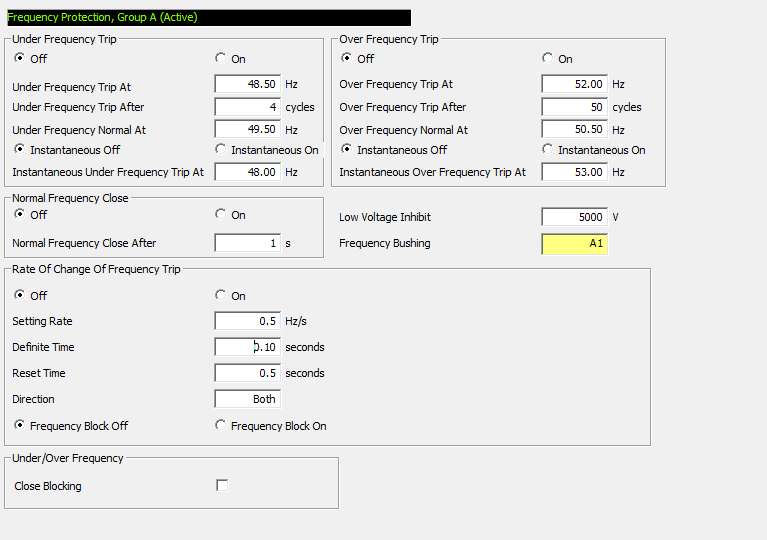
Figure 174
Under or Over Frequency protection
frequency settings
Under and Over Frequency can also be configured on the operator interface.
The allowed setting range for Under/Over Frequency protection is 45...65 Hz so it can be configured for use with system frequencies of 50 or 60 Hz.
The settings used to configure Under and Over Frequency protection are described in the table below:
Table 60 Under/Over Frequency Protection settings
|
Setting |
Description |
|---|---|
|
Under Frequency Trip On/Off |
This setting allows the Under Frequency protection to be enabled (On) or disabled (Off). Under Frequency tripping will not occur whilst set to Off. Range: Off – On Default: Off |
|
Under Frequency Trip At (Hz) |
The frequency value at and below which an Under Frequency pickup will occur. Range: 45.0 – (Under Frequency Normal setting – dead-band) Default: 49.0 |
|
Under Frequency Trip After (cycles) |
The number of continuous cycles at and below the Under Frequency threshold required before an Under Frequency trip will occur. Range: 2...1000 Default: 4 |
|
Under Frequency Normal At (Hz) |
The frequency at or above which the frequency is deemed to be Normal. Range: (Under Frequency Trip At setting + dead-band) – (OF Trip At setting – dead-band) Default: 49.5 |
|
Instantaneous under frequency At (Hz) |
If a frequency measurement is below the instantaneous under frequency trip value in the setting trip value in the setting, an instantaneous trip will occur. Range: Instantaneous Off/On Default: Off |
|
Over Frequency Trip On/Off |
This setting allows the Over Frequency protection to be enabled (On) or disabled (Off). Over Frequency tripping will not occur whilst set to Off. Range: Off – On Default: Off |
|
Over Frequency Trip At (Hz) |
The frequency value at and above which an Over Frequency pickup will occur. Range: (Over Frequency Normal setting + dead-band) – 65.0 Default: 52.0 |
|
Instantaneous over frequency At (Hz) |
If a frequency measurement is above the instantaneous over frequency trip value in the setting, an instantaneous trip will occur. Range: Instantaneous Off/On Default: Off |
|
Over Frequency Trip After (cycles) |
The number of continuous cycles at and above the Over Frequency threshold required before an Over Frequency trip will occur. Range: 2...1000 Default: 50 |
|
Over Frequency Normal At (Hz) |
The frequency at or below which the frequency is deemed to be Normal. Range: (UF Trip At setting + dead-band) – (Over Frequency Trip At setting – dead-band) Default: 50.5 |
|
Low Voltage Inhibit (V) |
The voltage at or below which the Under/Over Frequency protection will be disabled. Range: 4000...23000 Default: 5000 |
|
Normal Frequency Close On/Off |
This setting determines whether a Normal Frequency Close can occur after a UOF protection trip. Range: On – Off Default: Off |
|
Normal Frequency Close After (seconds) |
The time that the frequency of the voltage on the frequency bushing must have returned to normal before auto closing takes place. |
A dead-band of 0.2 Hz is imposed to provide hysteresis and helps to prevent a frequency value that is fluctuating around a pickup threshold setting from causing excessive pickup/reset events.
The setting range for the Trip At and Frequency Normal settings are partly determined by the dead-band.
For example, if the Under Frequency Trip At setting is 48.0 Hz, the Under Frequency Normal At setting must be at least 48.2 Hz. The Under Frequency Trip At setting must also be at least 0.2 Hz lower than the Over Frequency Trip At setting.
Illegal settings cannot be entered either via the O.I. or WSOS. When entering these settings via WSOS the setting dialogue will display the legal range for that setting.
See example below: